.png)
After snapping on prescription lenses (an additional $50 from HonsVR) above the a01+'s display, I plugged the glasses into my iPhone and was immediately taken aback. In front of me was an enormous replication of my iPhone's home screen — something I stare at dozens of times a day, but not on a 147-inch scale. The glasses automatically adjusted to horizontal viewing mode when I started playing videos on YouTube, and I spent more time than I'll admit gawking at movie trailers and music videos.
Even at just 1080p, the a01+'s screen excels at video. The large virtual screen makes just about everything look cinematic, and its healthy amount of brightness and contrast makes everything pop. I could clearly make out minute details in The Odyssey's trailer, like the soldiers' elaborate armor and Matt Damon's scraggly beard as Odysseus. Colors also looked bold and beautiful, as expected of a Micro-OLED screen. The glasses' tiny speakers also surprised me — they were detailed enough to make The Odyssey's trailer sound epic, despite not having much low-end punch.
I quickly grew to appreciate the simplicity of wearing the XBX a01+. It doesn't have to be charged like the Vision Pro or VR headsets, and its svelte design makes it easy to wear at the end of the day, when I often feel too tired to deal with finicky gadgets. I could just lay down in bed, plug it into my iPhone and watch whatever I want. It was particularly helpful for nights when my daughter needed a lot of help getting to sleep, and I couldn't just run downstairs to my home theater.
When connected to my MacBook Air, the XBX a01+ also proved to be a solid accessory for work. Sure, the 1080p resolution makes it tough to multitask, but it was nice to get a chunk of this review written without craning my head down. I could just look forward and stare directly at the a01+'s screen (and look very silly while doing so, I'm sure). The glasses' screen is sharp enough to read small text, edit photos and browse the web. It's ideal for situations where you need to work on a sensitive project privately, like on a plane or crowded cafe.
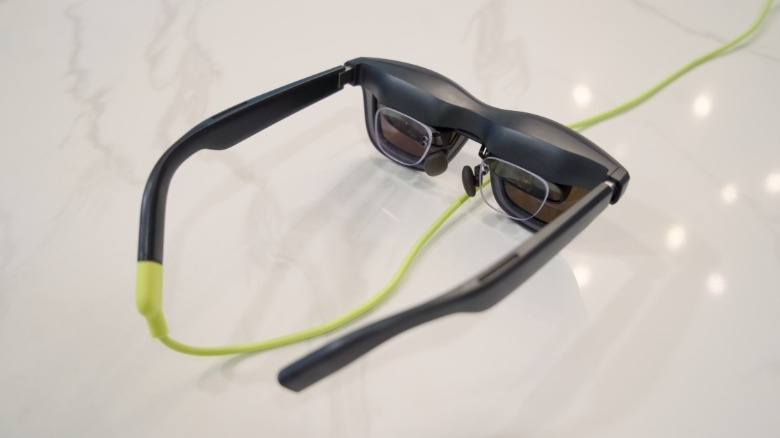
I spent several hours writing outside on my deck while wearing the a01+, and I found the experience to be far more comfortable than using the Apple Vision Pro in the same situation. The a01+ feels the same as wearing my normal sunglasses, the only difference is that I have to make room for the USB-C cable connecting it to my MacBook. It's not a massive gadget sealing in moisture and heat like the Vision Pro (which I could never imagine using outside on a steamy summer day in Georgia). While it gets warm around its display area, the A01+ was never hot enough to make me sweat or feel uncomfortable.
I don't normally wear headphones outside due to the aforementioned heat, plus I don't want to block out the soothing sounds of nature. The a01+'s side-firing speakers solved those issues: They gently serenaded me without generating heat, and since they don't close off my ears, I could still hear all of the birds and wildlife chirping around me. I could even hear the gentle fluttering of hummingbirds that love to hover near me while I write.
To test out gaming, I plugged the a01+ into my Steam Deck and spent several hours working through my backlog on the glasses's 147-inch virtual screen. It worked flawlessly, without any need for configuration. Not surprisingly, its large display felt far more immersive than the Steam Deck's portable screen, especially while playing graphically demanding games like Star Wars: Jedi Survivor. (Of course, that also makes it far easier to notice the graphical limitations of the Steam Deck itself.)
I also spent a few hours playing Overwatch 2 and 007: First Light with the XBX a01+ connected to my gaming desktop, and it also worked like a charm. I'd wager anyone with a powerful desktop already has a decent monitor, but the a01+ would be a great way to enjoy more immersive gaming on the go with gaming laptops.
It's just a shame that the Nintendo Switch 1 and 2 don't support display glasses like the XBX a01+. You could make those devices work with a portable dock solution like the Viture Pro Mobile Dock ($89.10), but that's an additional expense and yet another device to carry around. Unfortunately, Xreal canceled plans for its own portable dock, the Xreal Neo, earlier this year.






 English (US) ·